


Audacy: Radio & Sports Talk
3.123.46K Reviews
App Specs
- Version
- 2026.06.01
- Updated On
- License
- Free
- Downloads
- 5,000,000+
- Developer
- Audacy, Inc.
- Categories
- Music & Audio
- Platform
- Android, iOS
Screenshots
 Analysis by AppCompare
I keep coming back to Audacy: Radio & Sports Talk for one particular reason: it makes live listening feel more useful than simply opening a playlist. Its strongest capability is bringing radio stations and spoken programming into one place, so I can move between music, news, sports talk, and podcasts according to what is happening around me. That sounds simple, but the difference matters when I want a live voice, a local perspective, or a program that is tied to a particular moment rather than an endlessly personalized queue.
Developed by Audacy, Inc., this free Music & Audio app is aimed at listeners who still value scheduled radio but also want the convenience of an app. It has been available since January 12, 2011, and the current version is 2026.06.01. The broad audience is reflected in its reach, with more than five million installs, although its average rating sits at 3.1 from roughly forty-five thousand ratings. I read that combination as a useful warning: plenty of people find a reason to keep it, but the experience is not universally smooth.
Live radio is the feature that changes the way I use it
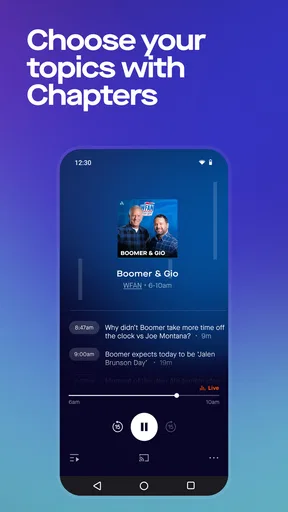
The central appeal is not just having audio on demand. It is the ability to choose a station or talk program and let a live stream shape the listening session. With a music service, I usually begin by deciding exactly what I want. With Audacy, I can start from a station, a sports discussion, a news segment, or a podcast and allow the programming itself to guide the next half hour.
That distinction is especially noticeable during ordinary routines. I might use a music station while making breakfast, switch to sports talk while commuting, and save a podcast for a quieter part of the day. The app is most convincing when I do not want to build a playlist or spend time selecting individual tracks. It gives me a sense of company and context that an algorithmic music queue does not always provide.
I also like the way this capability suits listeners who follow subjects rather than only artists. Someone checking in on a team, looking for current news conversation, or wanting familiar radio personalities can get more value here than from a standard music-only service. The app’s store summary covers radio stations, podcasts, music, news, and sports, but in practice the important point is the transition between those types of listening.
That transition is also where expectations need to be realistic. Live radio is not the same as a personal library. I cannot treat every station like an on-demand playlist, and a program may not fit my mood when I open it. The reward is immediacy and discovery; the cost is less control. For me, that trade is worthwhile when I want a live atmosphere, but not when I need a carefully ordered soundtrack.
What using the app feels like in practice
I approach the app as a starting point rather than a catalog that I must explore completely. I choose the kind of listening I need first, then look for the station, show, or podcast that matches it. This keeps the session focused. If I open it without a purpose, the mixture of radio, sports, news, and podcasts can feel broader than necessary, especially when I only want background music.
Worth Reading Before You Choose

Flipboard Shows What News Apps Must Do Beyond the Feed

Switching to Android Auto Means Rethinking Your Driving Routine

Google Calendar Makes a Crowded Week Easier to Manage

Ludo King Makes the Most of the Minutes Between Plans

Baby Panda World Brings Quick Play to Modern Phones, but Its Game Library Feels Busy

ESPN’s Live Game View Makes Following Close Games Easier
A useful habit is to decide whether I want live programming or a more deliberate podcast session before browsing. Live radio works well when I am doing something else and want the app to make the programming decisions. Podcasts work better when I have a specific subject or enough uninterrupted time to follow an episode. Treating those as separate modes prevents the app from feeling unfocused.
The live format also changes how I judge interruptions. With a playlist, a song I dislike is easy to skip. With a station, a talk segment, advertisement, or song I would not have selected may be part of the experience. I do not consider that a defect in the basic idea, but it does mean the app is better for flexible listeners than for people who expect complete control over every minute.
On a phone, I would use it during a commute, while cooking, or when doing household work. Those are situations where repeatedly choosing content is inconvenient. The app’s value comes from reducing that decision-making. I can begin with a live station and keep moving, rather than stopping what I am doing to manage a queue.
For a podcast-focused listener, the workflow is different. I would use the app when I want spoken content alongside the live radio selection, but I would still think about how I organize shows and episodes. The most practical approach is to keep a short mental list of programs I return to, instead of browsing randomly each time. That makes the broad selection feel manageable and helps separate regular listening from one-off discovery.
A realistic morning and commute test
Imagine a weekday morning when I have ten minutes to prepare breakfast and then need to leave. I do not want to choose an album, compare playlists, or search for a long episode. I open Audacy, select a station or talk stream, and let it fill the room while I get ready. If I want a different mood after leaving, I can move toward sports, news, or another station without changing apps.
That same scenario shows the app’s strongest practical advantage: it replaces several small listening decisions with one live choice. I am not claiming it removes every bit of browsing, but it can make audio feel less like a task. The station becomes the background, while I focus on driving, walking, cooking, or working.
There is a trade-off during a commute, though. I would not depend on any live stream as my only option in a place where connectivity is unreliable. A live listening habit works best when the phone can maintain the stream consistently. If I know I will be without a dependable connection, an offline-oriented music or podcast service is a safer companion.
For sports fans, the same routine can be more focused. I can use a talk stream when I want ongoing discussion rather than a short update. That is useful when the value lies in commentary, reaction, and conversation. However, anyone seeking only a specific score or a brief result may find a dedicated sports information tool faster than opening an audio app.
Why live programming can beat the usual alternatives
Compared with a conventional music streaming service, Audacy feels less personalized but more connected to radio culture. A playlist service is usually better when I know the exact artist, album, or mood I want. Audacy is better when I want a station’s identity, live pacing, and mixture of music or conversation.
Compared with a podcast-only app, it has a wider listening purpose. I can move from an episode to live radio or sports talk without changing platforms. That convenience is meaningful for people who alternate between scheduled programming and on-demand listening. The downside is that a specialist podcast app may offer a more focused way to manage a large listening queue.
Compared with listening through a station’s individual app, the broader Audacy environment can be more convenient for someone who follows several kinds of programming. I do not have to think of the experience as belonging to one station or one subject. The app makes more sense when my habits cross those boundaries.
Still, I would not replace every audio service with it. A listener who wants lossless music, a carefully controlled personal library, or a completely ad-free-feeling session should look elsewhere. Audacy’s strength is the live and conversational side of audio, not the promise of total customization.
The friction I noticed before recommending it
The 3.1 average rating is consistent with my overall impression: the concept is appealing, but the experience can depend heavily on what I expect from it. People who approach it as a radio and talk platform are more likely to understand its compromises. People expecting a polished, fully personal music service may be disappointed by the limits of live programming.
Another source of friction is the app’s range. Having music, news, sports, stations, and podcasts together is useful, but it can also make the first few minutes feel busy. I recommend beginning with one clear purpose, such as finding a live station for a drive or locating a sports conversation, rather than trying to understand every part of the app at once.
The free price makes trying it easy, and I appreciate that I can test the listening style without committing money first. Free access also means I judge it as a practical radio companion rather than as a premium replacement for every audio service. If I want a highly controlled experience, I am willing to use another app alongside it.
The Teen content rating is worth keeping in mind for families. I would not hand it to a younger child assuming that every station, discussion, or podcast will suit them. A teenager may find the mix appropriate depending on the program, but parents should still pay attention to what is being played rather than treating the entire catalog as one uniform type of content.
Device compatibility is another quiet advantage. The app supports Android 7.0 and later, so it remains accessible on a wide range of Android phones. That does not guarantee identical performance on every device, but it lowers the barrier for people using older hardware who want a current radio app without immediately replacing their phone.
Small habits that make the experience better
My first tip is to separate “I want something live” from “I want something specific.” If I want live audio, I choose a station and accept its rhythm. If I want a particular subject, I go toward a podcast or talk program instead. That simple distinction prevents me from blaming the app when the real issue is choosing the wrong format.
My second tip is to use it for transitions in the day. The app works especially well when I am moving between activities and do not want to curate audio repeatedly. A station can bridge breakfast and commuting, while a podcast can take over when I have enough attention to follow a longer discussion.
My third tip is to keep a backup listening plan. Live radio is valuable precisely because it is live, but that also makes it less predictable than downloaded content. I would keep another audio option available for travel, weak-signal areas, or moments when I need uninterrupted listening.
Finally, I would judge the app by the stations and programs I actually return to, not by the size of its overall mix. A broad catalog is only useful if it contains the type of live or spoken audio I enjoy. Spending a short trial period identifying reliable favorites is more helpful than opening it occasionally and deciding that the whole service feels random.
Who gets the most from Audacy
I recommend it most to radio listeners who want a modern way to carry familiar formats with them. It is also a good fit for people who move between music, news, sports talk, and podcasts and prefer one app for those changes. Drivers, commuters, home workers, and anyone who likes audio in the background can understand its appeal quickly.
Sports followers may gain particular value when they enjoy discussion and ongoing commentary rather than only checking results. The app can become a regular part of a routine around games or sports news, especially for listeners who prefer hearing a conversation develop instead of reading a short update.
It is less suitable for someone who wants a perfectly controlled music queue, a specialist podcast library, or a completely predictable listening session. I would also suggest skipping it if the main goal is offline playback or precise audio customization. Those needs point toward a different category of service.
After using it with those expectations, I see Audacy, Inc.’s app as a useful live-audio companion rather than an all-purpose replacement for every music and podcast tool. Its most important benefit is the way a station or talk stream can carry a routine without constant input. The 5M-plus install reach shows that this radio-centered approach still has an audience, while the middling rating reminds me to recommend it selectively.
My final advice is simple: try it if you miss the feeling of turning on a station and letting the programming unfold. Start with one listening situation, such as a commute or a morning routine, and see whether the live format fits your habits. If it does, the free app can become a convenient bridge between traditional radio and modern podcast listening. If you need total control, offline certainty, or a carefully engineered personal playlist, I would choose a more specialized alternative instead.
Pros
- Large selection of live radio stations
- podcasts
- and sports talk shows.
- Personalized recommendations make discovering new audio easier.
- Live sports coverage includes commentary
- analysis
- and team-focused programming.
- On-demand episodes let you catch up with missed shows anytime.
- Clean
- modern interface makes browsing stations and podcasts straightforward.
Cons
- Some content and live broadcasts may be restricted by location.
- Ad frequency can be noticeable during free listening sessions.
- Certain shows may require an Audacy account or subscription access.
- Audio quality and stream stability can vary by station and connection.
- Background playback may consume significant battery and mobile data.
FAQs for Audacy: Radio & Sports Talk
What is Audacy: Radio & Sports Talk, and what can I listen to in the app?
Audacy is a streaming app focused on live radio, sports talk, news, podcasts, and on-demand audio. During testing, its main appeal was the mix of local and national programming, including talk stations, music channels, sports coverage, interviews, and podcast episodes. Available stations and shows can vary by location, so the catalog you see may depend on your region.
Can I listen to live radio and sports content for free?
Yes, Audacy generally allows users to stream many live radio stations, sports talk programs, news broadcasts, and podcasts without purchasing a subscription. However, free listening may include advertising, and some content can be affected by regional restrictions, broadcast rights, or availability changes. You should also check your mobile data usage when streaming away from Wi-Fi.
Does Audacy offer local stations and personalized content?
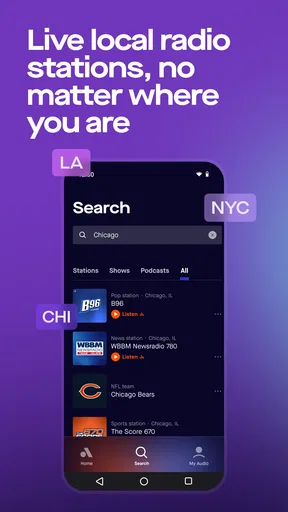
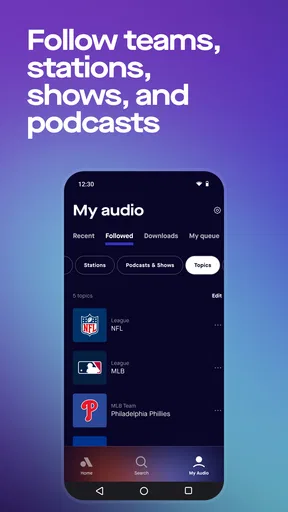
The app can use your location or selected market to help display nearby radio stations, local news, and regional sports programming. You can also browse or follow stations, shows, and podcasts to make frequently used content easier to find. The quality of personalization depends on your location, listening history, and how much relevant programming Audacy offers in your area.
Can I listen to Audacy offline or download shows for later?
Audacy is primarily designed for online streaming, especially when listening to live radio and sports broadcasts. Some on-demand podcast content may provide download or offline-listening options, but this is not necessarily available for every program or live station. If offline access is important to you, check the specific episode or show page before relying on it during travel.
What permissions and account features does Audacy require?
You can usually explore parts of Audacy without creating an account, but signing in may be useful for saving favorites, synchronizing preferences, and continuing your listening experience across supported devices. The app may request permissions such as notifications, location, and access to Bluetooth or connected audio devices. Review these requests and disable any permission you do not need in your device settings.


